Core Modules
1. Campaign Dashboard
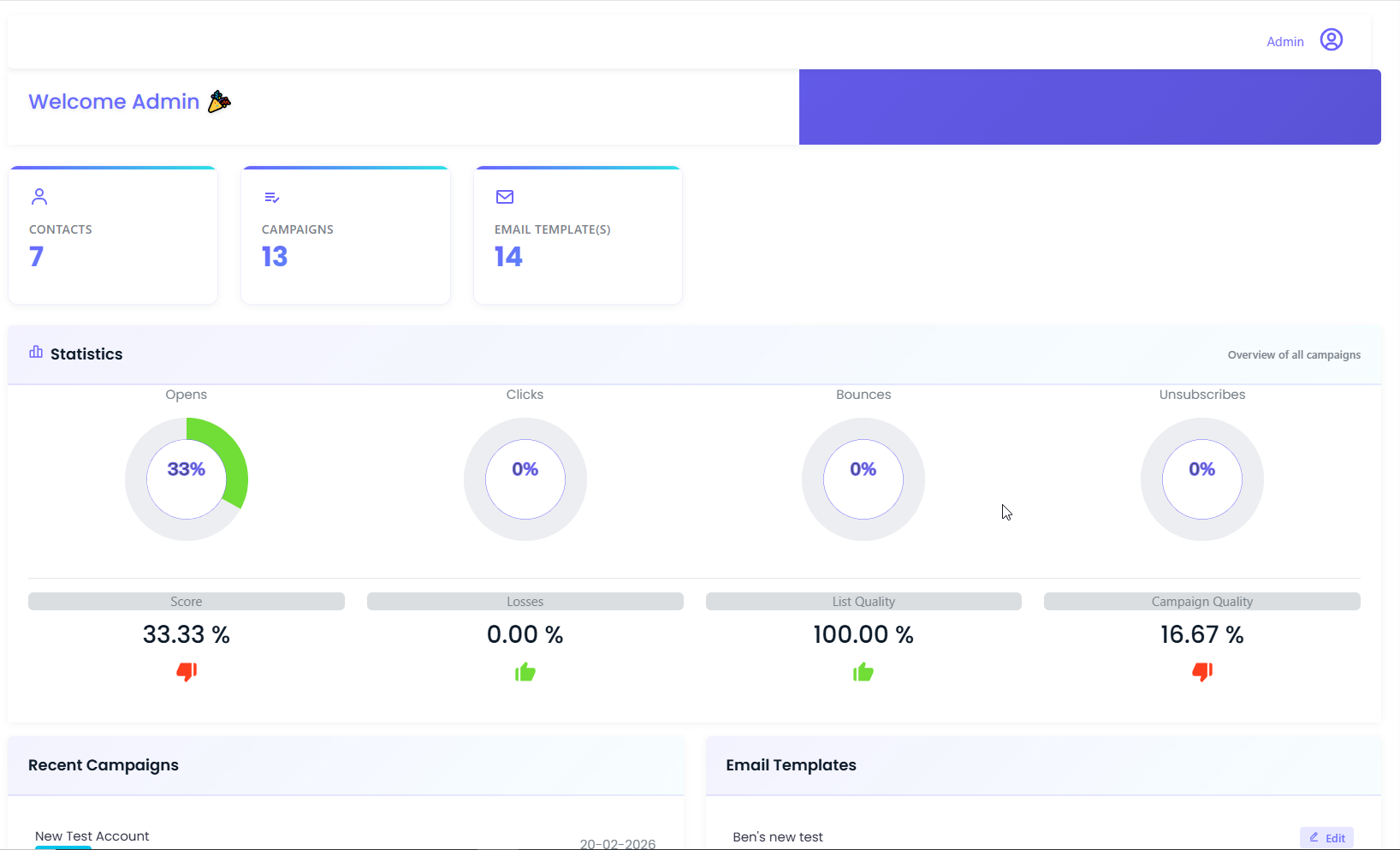
The admin dashboard gives a real-time, birds-eye view of the entire email operation at a glance:
Summary Stats (live counters):
-
Total Contacts in the system
-
Total Campaigns created and launched
-
Total Email Templates available
Campaign Performance Statistics:
Every campaign's aggregated performance is visualized through clean donut charts:
| Metric |
What It Tracks |
| Opens |
% of recipients who opened the email |
| Clicks |
% who clicked any link inside |
| Bounces |
% of emails that failed to deliver |
| Unsubscribes |
% who opted out |
Derived Scoring:
The dashboard also computes four higher-level quality signals:
-
Score: Overall campaign health rating
-
Losses: Percentage of audience lost (bounces + unsubscribes)
-
List Quality: Health of the contact database (deliverability signal)
-
Campaign Quality: Composite performance across all active campaigns
Each Metric:
Shows a thumbs-up/down indicator so campaign managers immediately know what needs attention without
digging into reports.
The Recent Campaigns Panel:
Shows the last launched campaigns with timestamps and launch status badges.
Upcoming Campaigns Panel:
Scheduled campaigns queued for future send dates.
Email Templates Panel:
Quick access to recently used templates with inline Edit buttons.
The Submission Accounts Panel:
Displays connected sending accounts with their setup dates for audit tracking.
2. Drag-and-Drop Email Template Builder
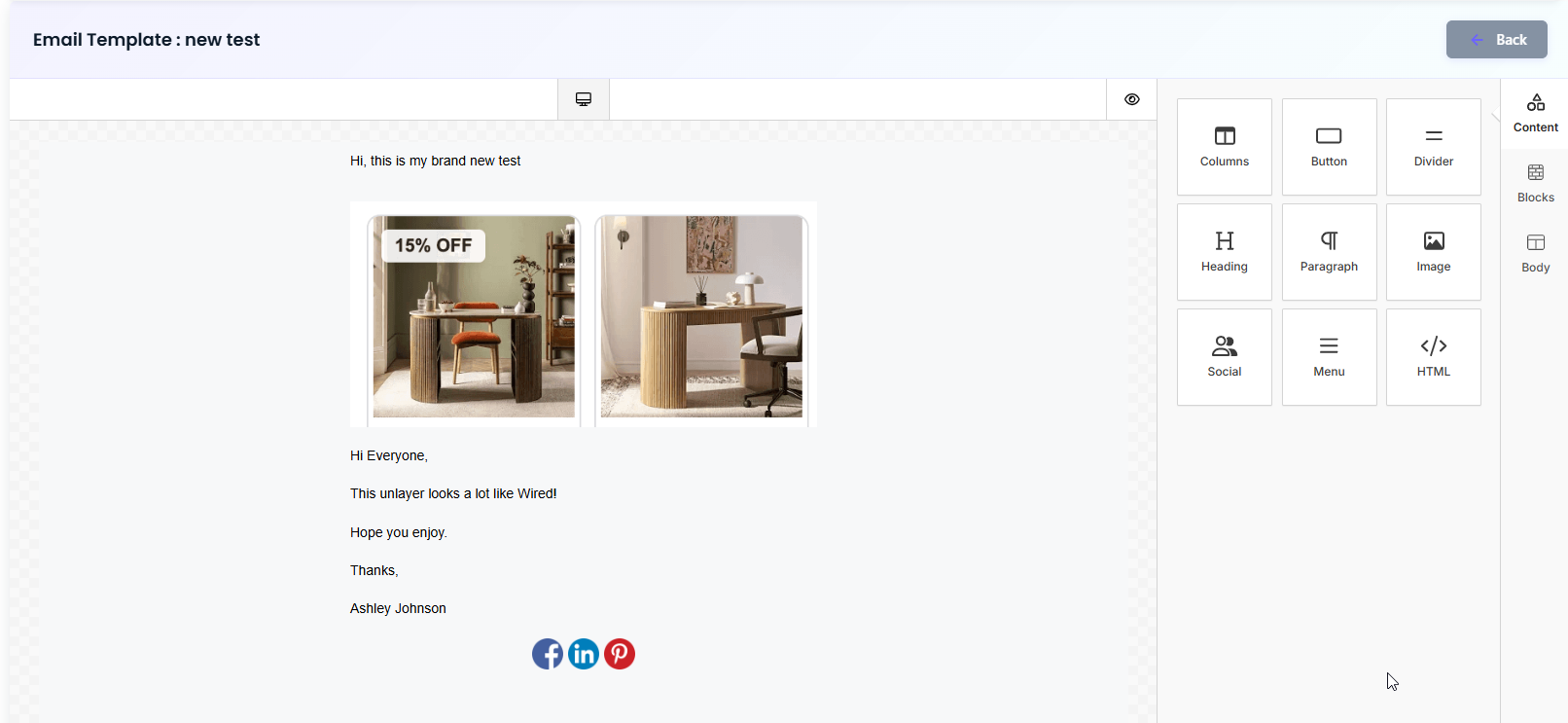
One of the most powerful features of the platform is its built-in visual email design studio, a
professional-grade, drag-and-drop editor that lets marketers and designers craft pixel-perfect emails
without ever leaving the platform or touching a line of code.
What designers can do inside the editor:
-
Columns: Multi-column layout blocks for structured, grid-based content
-
Button: CTA buttons with custom styling, link targets, and hover states
-
Divider: Clean visual section separators for structured layouts
-
Heading: H1/H2/H3 text blocks with full typography and color control
-
Paragraph: Rich body copy blocks with inline formatting
-
Image: Image uploads with alt text, sizing, and link wrapping
-
Social: Pre-built social media icon blocks (LinkedIn, Instagram, X, etc.)
-
Menu: Navigation-style link rows for header-style email bars
-
HTML: Raw HTML block for developers who need full custom control
Desktop and mobile preview toggle:
Designers can switch between device views while editing to verify responsiveness before a single
email goes out.
Template actions:
-
Save: New templates with a custom name to the library
-
Clone: Existing templates to spin up variations without starting from scratch
-
Edit: Any saved template at any time before, between, or after campaigns
-
Assign: Templates directly to campaigns from the template library
The result:
The entire email creation workflow from blank canvas to send-ready design happens entirely within the
platform. No external tools, no file exports, no back-and-forth.
3. Campaign Management
The Campaign module handles the full lifecycle of every email sent:
Campaign Creation:
-
Name, category, and description
-
Select target contact group(s)
-
Assign an email template from the library
-
Choose the submission account (sending identity/domain)
-
Set send date/time (immediate or scheduled)
Campaign States:
-
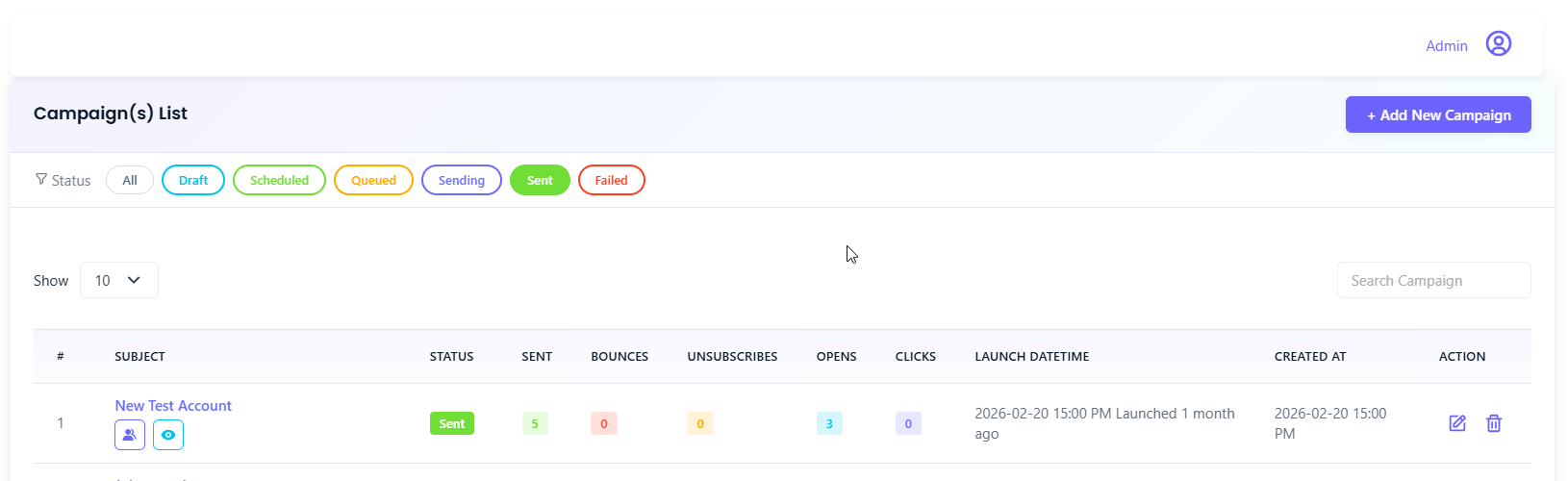
Launched: Live campaigns with full analytics available
-
Scheduled: Upcoming campaigns queued for future delivery
-
Draft: In-progress campaigns not yet sent
Per-Campaign Analytics:
Every launched campaign has its own detailed stats page showing opens, clicks, bounces, and
unsubscribes broken down by recipient, enabling granular performance review and list hygiene
decisions.
4. Contacts & Groups
Contacts Module:
-
Add individual contacts manually or via bulk import (CSV)
-
Full contact profile: name, email, category, group membership
-
Contact status tracking (active, unsubscribed, bounced)
-
Search and filter across the entire database
Groups Module:
-
Organize contacts into named groups (e.g., "Newsletter Subscribers", "VIP Clients", "Event
Attendees")
-
Campaigns can target one or multiple groups simultaneously
-
Groups are updated dynamically new contacts added to a group are automatically included in future
sends
Category Module:
5. Submission Accounts
A critical infrastructure feature that most off-the-shelf tools don't expose to users.
Each Submission Account is a configured sending identity, a verified email address, and a domain
connected through SendGrid that campaigns are sent from.
What this enables:
-
Different clients or brands can use different sender identities from the same platform
-
Domain reputation is isolated per submission account. A bounce spike on one account doesn't
affect others
-
Full audit trail: each account shows its connection date and send history
-
Admins can add, test, and manage multiple SendGrid-connected accounts without touching code
6. Multi-Tenant Registration & White-Label Reseller Architecture
From the start, the platform was architected with a future-ready goal in mind; the client should be
able to resell this tool as their own SaaS product to their own customers without any rebuild.
Registration & Onboarding Layer:
-
A public-facing registration flow allows new organizations to sign up and get their own isolated
account on the platform
-
Each registered organization operates in a completely sandboxed environment; their contacts,
campaigns, templates, and submission accounts are fully separate from every other tenant
-
Admins can approve, suspend, or manage registered organizations from a master admin panel
Team Setup Within Each Account:
-
Once an organization is registered, it can build out its own internal team
-
Role-based user management allows account owners to invite team members with specific permissions
(Admin / Editor / Viewer)
-
Teams work within their organization's workspace without any visibility into other tenants' data
Reseller-Ready Design:
-
The platform's branding, domain, and identity are fully customizable. Each registered customer
can operate under their own brand experience.
-
Billing and subscription logic hooks were architected into the data model, ready to be activated
when the client decides to monetize
-
This effectively transforms the tool from an internal campaign platform into a white-label SaaS
product that the client can take to market independently.
This layer was one of the most strategically significant parts of the build. It means the platform
doesn't just solve today's operational problem; it creates an entirely new revenue stream for the
future.
Users Module:
-
Create and manage team members with role-based access
-
Admins have full platform access; editors can manage templates and campaigns; viewers can access
analytics only
-
User activity logging for accountability
This made the tool viable for agencies managing campaigns on behalf of multiple clients; each team
member works within their permissions without risk of accidental cross-campaign interference.