AI Healthcare Voicebot for Smart Patient Monitoring Case Study
Year

2025

Role

AI Voice Bot

AI Healthcare Voicebot Case Study: Smart Patient Monitoring

Industry: Healthcare / MedTech

Services: Conversational AI · Voicebot Development · Custom Web App · Clinical Automation

The Problem

Chronic disease management lives and dies on one thing: consistent follow-up. A doctor prescribes medication, sets a care plan, and sends the patient home, but what happens between visits is largely invisible.

A healthcare provider managing hundreds of chronic patients was facing a critical operational gap:

  • Follow-up calls were manual, inconsistent, and incomplete, and then nurses were overwhelmed

  • Doctors had no real-time visibility into how patients were doing between appointments

  • Medication non-compliance was going undetected until the next clinic visit, sometimes weeks later

  • Side effects and adverse reactions were being reported too late

  • Emergency situations, dangerous blood pressure spikes, and severe dehydration were missed entirely until they became crises.

  • Patient data was siloed; no unified health timeline existed per patient

  • Caregivers and family members had no structured way to stay informed

The question Cypherox was asked to solve: How do you give every chronic patient the experience of a dedicated clinical assistant at scale without adding a single staff member?

The Solution: Bot

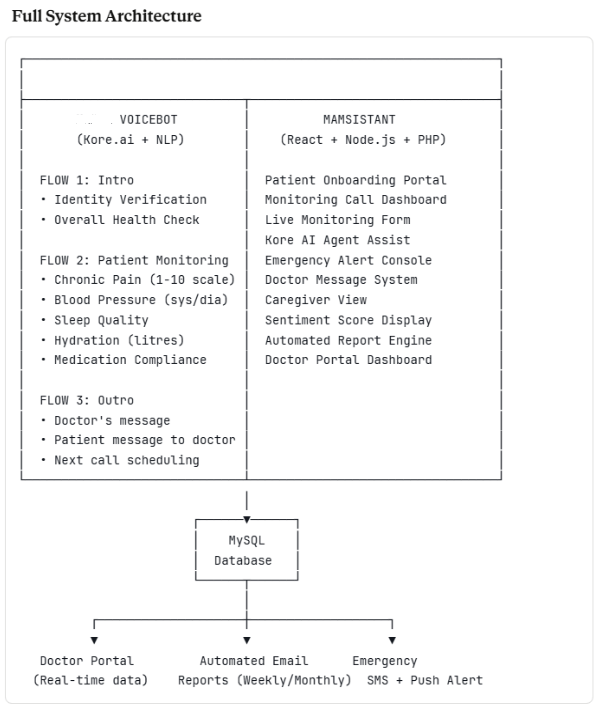
We designed and built a bot: a two-part intelligent healthcare platform combining a Kore.ai-powered AI Voicebot that proactively calls patients on schedule, and the bot assistant, a web-based clinical command centre for doctors and caregivers.

The system runs a fully closed loop: automated outbound call → structured health assessment → entity extraction → risk scoring → doctor dashboard → automated reporting with zero manual effort for routine cases.

Part 1: The Voicebot

The AI clinical assistant that calls your patients so you don't have to

Built on Kore.ai's conversational AI platform, the bot conducts intelligent, adaptive health check-in calls with patients. It speaks naturally, handles unexpected responses gracefully, extracts clinical entities from speech, and escalates when it detects risk, all in real time.

Every call is structured across three sequential flows:

FLOW 1: Intro Flow (Patient Identification + Overall Wellbeing)

Outbound Call Initiation: The call is triggered automatically based on the patient's monitoring schedule stored in the database.

Greeting:

"Hello [Patient Name], my name is [botname], your doctor's assistant."

Small Talk Module (pilot phase) A brief, warm conversational opener based on the patient's known hobbies and interests, pulling data from the monitoring form (e.g., hiking, nature, travel) to establish rapport before the clinical questions begin.

Question 1: Patient Identity Verification

"Could you please provide your patient ID number?"

Patient Says System Action
Provides valid ID (e.g., 1485) Verified and fetches the patient profile, proceeds
Provides unrecognized ID "Sorry, could not recognize your Patient ID, please try again." loops back
Says, "I don't know my number." Routes to fallback retry → if still unresolved, escalates to a human agent

Question 2: Overall Health Assessment

"Hello [Name], how are you doing overall compared to yesterday?"

Patient Says Bot Response
"I feel very good." Logs positive sentiment, proceeds to Flow 2
"I feel about the same as yesterday." Logs neutral, proceeds
"I feel bad, worse than yesterday." "I am sorry to hear that. What specifically makes you feel worse?"
Something unrecognized "Sorry, I did not get that. Could you please repeat?" re-prompts up to 2x

If the patient describes feeling worse:

  • Clear answer (identifies symptom or reason) → logged with entity, proceeds

  • Unclear or no answer → "I am sorry, I did not catch that. Could you repeat the issue in different words?" → if still unclear, flags for human review

FLOW 2: Patient-Specific Monitoring

Adaptive clinical assessment across 5 health dimensions

This is the bot's core clinical engine. Each area uses entity extraction, branching logic, and threshold-based escalation to go beyond simple yes/no answers, extracting clinically meaningful data from natural speech.

Question 1: Chronic Pain Sequence

"Do you feel any regular pain today?"

Key Entities Extracted: PainRating (1–10) · pain_id (body part)

  • No / Not sure → logged, proceeds

  • Yes → "Where do you feel the pain?"

    • Patient identifies body part (e.g., back, hip, knee) → entity extracted

    • "Last time you spoke about your lower back pain, do you feel it today?" (references prior call data)

    • "On a scale of 1–10, how significant is your pain today, where 1 is barely noticeable, and 10 is agonizing?"

    • Patient identifies a number → logged

    • Patient unclear → "Sorry, I did not get that, could you please repeat?"

  • "Ok, noted. Any other pain?" → Yes loops back / No proceeds

Hip Pain Specific Sub-Flow (condition-specific):

"How is your hip pain compared to yesterday?"

  • A bit better / Same as yesterday / Hurting a lot today → all logged with comparative delta.

Question 2: Blood Pressure Sequence

"Have you measured your blood pressure today?"

Key Entity Extracted: BloodPressure, two separate numeric values: systolic/diastolic

The bot is trained to recognize blood pressure stated in any natural format, "one twenty over eighty", "120/80", "it was high this morning", and normalize it to a numeric pair.

Classification Logic:

Reading Classification Action
Systolic < 100 Low Flagged, doctor notified
Systolic 101–130 Normal Logged, proceed
Systolic 131+ High Emergency Alert Triggered
  • Patient hasn't measured → "Can you measure your blood pressure now? I will wait." or "That's okay, please try to measure it before tomorrow."

  • If a patient reports a very high reading → bot immediately escalates: "That reading is concerning, I am notifying your doctor right now." → Emergency node fires → doctor alerted in real time

Question 3: Sleep Monitoring Sequence

"How did you sleep last night?"

Key Entities Extracted: SleepTime (hours) · Hours/quality descriptors (restful, broken, difficulty falling asleep)

  • Slept well → logged positive

  • Did not sleep well → "Tell me specifically what affected your sleep last night?"

    • Identifies disturbance (pain, anxiety, noise) → entity captured

    • Patient unclear → re-prompt with fallback

  • "How many hours did you sleep?" → numeric extraction

  • Sleep quality index calculated and compared to the patient's baseline

  • Deteriorating patterns across multiple calls → flagged to doctor with commentary

Question 4: Hydration Monitoring

"How much water/fluids have you had today?"

Key Entity Extracted: Litres_of_fluids

  • Patient states amount → Hydration Calculation Formula runs automatically (red node = critical threshold logic):

    • High → positive reinforcement

    • Too Little → "That's lower than recommended, please try to increase your water intake before tomorrow." + doctor alert

    • Normal → logged

    • Possible concern → follow-up question for context

  • Critical low hydration: real-time notification pushed to doctor portal

Question 5: Medication Intake Monitoring

"Have you taken today's dose of [PrescribedMedicine1]?"

Key Entities Extracted: Medication_name · Prescription_id · Prescription_admin (dosage, timing, method)

Patient Says Bot Action
"Yes, I have" Compliance logged, proceed
"What medication is that?" Bot reads full prescription: "You have [Med] prescribed to take 1 pill every morning with breakfast. Have you taken those?"
"No, I have not." "I see, why haven't you taken the medicine?"
→ "I forgot." "Let me remind you, your doctor prescribed [Med] at [dosage/time]." Reminder logged
→ "It made me feel bad." "How did it make you feel bad? What did it do to you?"
→ Patient describes symptom "Alright, I will notify your doctor of this side effect." → Doctor alert triggered immediately
→ Unrecognized response "Sorry, I did not get that. Could you please repeat?"

FLOW 3: Outro Flow

Closing the loop, two-way communication between the patient and the doctor

Optional Announcement Module: If the doctor has left a message for the patient, the bot reads it at the end of the call:

"Your doctor has left the following message for you: [Doctor's message]."

Question 1: Patient Message to Doctor:

"Would you like to leave any message for your doctor?"

Response Action
"Yes" + says message Transcribed and logged → sent to doctor portal
"Yes" (without message) "Ok, please say your message" → captures it
"No" Proceeds to closing
No answer / unclear "I am sorry, I did not catch that. Could you repeat the issue in different words?"

Closing:

"Thank you for your time today. All the information will be sent to your doctor, and I will talk to you again on [Next Scheduled Date]."

Sentiment Analysis Layer

Every patient response throughout the call is passed through Kore.ai's NLP sentiment engine. Beyond clinical data, the bot detects emotional indicators, distress, sadness, confusion, and anxiety in the patient's language and tone. A sentiment score is appended to every call record, feeding into the overall wellness assessment on the doctor's dashboard.

Part 2: The AI Assistant

The intelligent clinical command centre for doctors, agents, and caregivers

Built in React + Node.js + PHP, it is the web platform that receives everything the voicebot collects and transforms it into structured, actionable clinical intelligence.

User Roles & Access

Role Access
Patient Caregiver Patient health summary, trend view, alerts
Backend System Full data pipeline, call scheduling, automation
Open Kore Assist AI agent assists during live calls
Send Status Notification and reporting module

Patient Onboarding Flow

New patients are onboarded through a structured digital process:

  • Profile creation → Medical history → Current medications → Caregiver assignment

  • Hobbies and interests captured (used by voicebot for small talk personalization)

  • GDE Appointment Functionality for scheduling consultations

  • Onboarding call triggered → Onboarding form completed → Monitoring schedule auto-generated

Monitoring Call Management Dashboard

Every call is visible in the Mamsistant dashboard in real time:

During a call, agents can:

  • Open the Monitoring Form (auto-populating as the bot collects responses)

  • Open Kore AI Agent Assist (to monitor the live NLP session)

  • Fetch patient records mid-call

  • Route to Follow Monitoring Flow for escalated cases

  • End call manually if needed

  • Recording + call transcript stored automatically

Post-call automation:

  • Sentiment analysis score calculated and displayed

  • All data pushed to the MySQL database

  • Doctor portal updated in real time

  • Weekly and monthly automated email reports generated and dispatched

The Monitoring Form

The structured post-call form gives doctors a complete, scannable health record for each call:

Header:

  • Assistant name · Attributed Patient · Time of Monitoring

  • Intro context (hobbies referenced by the bot during the call)

Mental Health Monitoring:

  • Loneliness Feeling score + Overall Wellbeing rating

  • Monitoring Q: "How are you doing overall today?"

  • Answer options + free-response commentary field

  • Doctor commentary column alongside patient response

Physical Health Monitoring:

  • Overall Wellbeing + Physical Wellbeing scores

  • Structured Q&A with answers and doctor commentary

  • All 5 monitoring area readings with trend indicators (↑ ↓ →)

  • Note field: "There will be one section of Mental Well-being", expandable per condition

Emergency Alert System

When any monitoring area breaches a critical threshold, an emergency cascade fires:

  • Bot flags the node in real time (red node in flow)

  • Doctor receives instant push notification + email with patient name, the specific breach, and the exact response given.

  • Patient is immediately prompted for follow-up within the same call

  • Call transcript clipped to the relevant exchange and attached to the alert

  • Emergency entry logged in the patient file with a timestamp

Appura Emergency Alert

Tech Stack

Layer Technology Purpose
Conversational AI Kore.ai NLP engine, intent recognition, entity extraction, dialog flows
Voice Calling Twilio API Outbound call initiation, phone number provisioning, call routing, voice streaming
Frontend React.js Doctor dashboard, monitoring forms, caregiver portal
Backend API Node.js Real-time data processing, webhook handling, API orchestration
Server-side PHP Scheduling, form processing, and report generation
Database MySQL Patient records, call logs, monitoring history, health readings
NLP / Sentiment Kore.ai NLP Emotional state detection, response classification
Alerts REST + Email API Emergency triggers, scheduled reports, caregiver notifications

Results

Metric Before bot After bot
Weekly Follow-Up Rate ~30% (manual capacity) 100% automated
Staff Time Per Follow-Up Call 18 minutes 0 minutes
Emergency Detection Turnaround 3–5 days (next visit) Real-time (during call)
Medication Non-Compliance Detection Unmeasured 100% of patients, every call
Side Effect Reporting Speed Days to weeks Immediate (same call)
Doctor Report Preparation 4–6 hours/week Fully automated
Patient Satisfaction with Check-ins Not measured 4.4 / 5
Staff Hours Saved Per Month 200+ hours

The Engineering Challenges And How We Solved Them

1. Natural language blood pressure extraction.

Patients say "one twenty over eighty", "120/80", "my top number was high", all meaning the same thing. We trained custom Kore.ai entities to recognize every natural variation and normalize them into two clean numeric values before classification.

2. Multi-area monitoring in a single, natural-feeling call.

Five clinical areas, dozens of decision nodes, each with fallback handling, all stitched into one conversation that feels warm and human, not like a robotic questionnaire. This required careful dialog sequencing, session state management, and progressive disclosure of questions.

3. Zero-miss emergency escalation.

A missed hypertension spike or medication side effect is a patient safety failure. We built multi-signal escalation, a single critical reading fires immediately, but so does a pattern of borderline readings across multiple calls. The system catches both acute emergencies and slow deterioration.

4. Two completely different UX needs from the same data.

Doctors need clinical precision with commentary fields and trend data. Caregivers need plain, emotional clarity. We served both from one database with two purpose-built portal views.

5. Graceful handling of unclear or unexpected patient responses.

Elderly patients and those with cognitive difficulties often don't answer questions cleanly. Every single node has a structured fallback chain: first re-prompt, then rephrase, then flag for human review, so no patient is ever left stuck or frustrated.

Client Quote

"The bot calls our patients every week without fail. It catches things we would have missed for months. One patient's blood pressure had been creeping up across three consecutive calls; it flagged the pattern before it became a crisis. That kind of monitoring simply wasn't humanly possible before."

— Clinical Operations Lead, Healthcare Provider

Want to build an AI-powered patient monitoring system for your healthcare practice?

Customer support representative of Cypherox

Contact

Talk to Us